
- Home /
- REMOTES /
- Garage & Gate Remotes /
- Conqueror 4 Button Remote for Force Motor (Original)
Products
- ACCESS CONTROL
- AUTOMOTIVE LOCKS & KEYS
- CASH BOX / STORAGE
- CLEARANCE ITEMS
- DOOR HARDWARE
- ELECTRIC LOCKS
- ELECTRONIC DIGITAL LOCKS
- ELECTRONIC SMART LOCKS
- FIRE & SAFETY
- KEY MANAGEMENT
- KEYS
-
LOCKS
- Anchors
- Camlock
- Cavity Slider Locks
- Commercial Digital Locks
- Commercial Knobsets/Leversets
- Commercial Mortice Lock Accessories
- Commercial Mortice Locks
- Cupboard / Cabinet Locks
- Deadbolts
- Deadlatches / Deadlocks
- Digital Mechanical Locks
- Garage Door Locks
- Gate Locks
- Latch Bolts
- Lock Cylinder
- Locking Bolts
- NIghtlatches
- Ranchslider Locks
- Rebate Kits
- Residential Knobsets/Leversets
- Residential Mortice Locks
- Rim Locks
- Security Screen Door Lock
- Speciality Locks
- Strike Plates
- Window Locks & Stays
- PADLOCKS
- REMOTES
- RESTRICTED KEY SYSTEMS
- SAFES
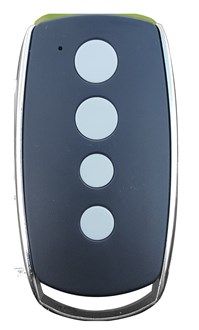
Conqueror 4 Button Remote for Force Motor (Original)
Stock Code:
510040
Price:
$103.50 (Incl. GST)
Description
CONQUEROR PROGRAMMING INSTRUCTIONS
For Force motors; 600N, 800N, 1000N, 1200N, Force-Matic, Force-Speed
Programming Transmitters
1. Press the "CODE" button. a Dot will be indicated in the corner of the display.
2. Now press the button on the hand transmitter you want to use, pause for 2 seconds, then press the same button on the hand transmitter again for 2 seconds
The Dot on the display will flash to confirm the code, then turn off.
Repeat the process for additional remotes that need to be stored.
NOTE: Hand transmitters that are supplied with the door opener are pre-programmed.
Deleting Transmitters
Press and hold the "CODE" button until a "C" is indicated on the display.
All stored remotes will be deleted.